Direct Manipulation of Avatars for Expression and Animation Editing
(a technology developed at Linden Lab using physically-based avatars)
JJ Ventrella
Other web sites about Avatar Puppeteering:
| 'lectric Sheep | SL Wiki | SL Blog | Tao Takashi | PRNewswire |
1. Introduction

|
More Expressive Avatars
An underlying motivation for Avatar Puppeteering is to enable a more fluid, more direct way to manipulate the avatar. As the original avatar developer at There.com , I was able to get some avatar expressivity baked into the underlying codebase, with the initial collaborative support of Will Harvey, and later, Chuck Clanton, Tom Melcher, and many other folks who contributed to the expressive avatars in There. Then, in my next life, during my two years as a Senior Developer at Linden Lab, Avatar Puppeteering was my most ambitious attempt at adding a layer to the avatar technology that would allow more fluid and immediate interaction with the world and with the user's touch. My other major accomplishments were Flexi Prims and FollowCam. |
In Second Life, residents have extensive tools to build objects, and script various aspects of the world. But there is not as much manipulation and creative freedom in terms of developing behaviors, expressions, and movements in one's avatar - the fulcrum of social connectivity in a virtual world. Puppeteering has the potential to provide a way for residents to manipulate their avatars in numerous ways, including through motion-capture, using input devices similar to the Wii. As of now (March, 2008) the technology has not yet been fully deployed, but I hope it will soon be re-visited, as I think it would add a level of expressivity and direct expression to the avatars in Second Life. |
|
The Physical Avatar
Techniques for animating avatars are increasing in number and sophistication. But they are still largely based on the linear narrative of film technology, whereby character animations are crafted beforehand using keyframing, inbetweening, etc., stored in a file, and then played using various triggers in the context of a dynamic virtual world. The animations look exactly the same each time they are played - which is of course desirable in the case of a feature film - but not very useful in terms of spontaneous expression in an online world. To accommodate the novelty and unpredictability of online virtual worlds, hybrid layers of procedural animation are required. Such as using IK to register feet on the ground, head rotation IK to affect gaze, and various other techniques. These procedural layers are necessary for the avatar to adapt to an unpredictable environment and to respond to user intent. But the level of spontaneous affect and direct manipulation is still very limited. |
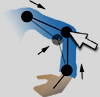
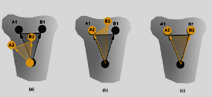
Avatar Puppeteering introduces a completely physics-based means of naturalistically animating the avatar, in which every joint can be pushed, pulled, or rotated in real time for maximum expressivity and responsiveness. The underlying technology for Puppeteering is called "Physical Avatar" - it is called that because it uses forward dynamics to affect the positions of avatar body parts in the virtual world. Think of it as Ragdoll Physics without gravity. This is explained in the sections below. |
2. Avatar Representation
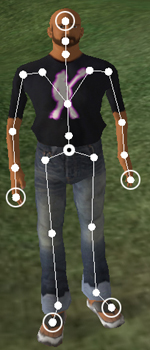
| To explain how Puppeteering works, I will first describe the avatar skeleton. The skeleton consists of a set of joints connected hierarchically. |

|
| The pelvis is the parent of the two hip joints and the torso joint. We also refer to the hips and torso joints as "children" of the pelvis joint. Notice the five end-effectors (head top, fingertips, and toes). These are not part of the standard skeleton, but are added in the Physical Avatar representation, for reasons that are explained below. |
|
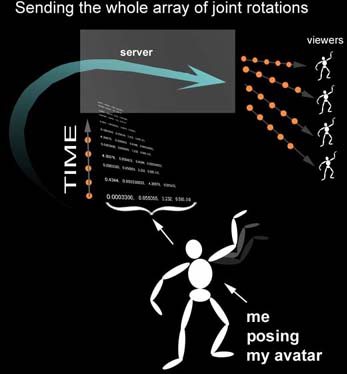
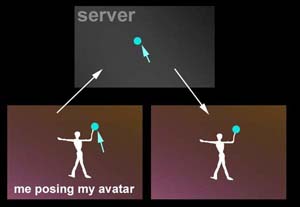
The Root The position and rotation of a character in a virtual world is typically stored both on a server as well as all the clients (viewers) of users who have the avatar within view. The positions and rotations of other avatars and objects are also represented this way. Most of these objects have associated polygonal models. In Second Life, some of these models (and all the avatars) have physics simulated using Havok. In the case of avatar, this model is actually a simplified shape, which is invisible, and used only for detecting collisions. When a user controls his/her avatar by walking around or flying, the changes in position and rotation are sent up to the server, so it can update accordingly, and pass this updated information back down to all the viewers. |
We often refer to this node in the hierarchy as the "root". The root is the "parent" of the pelvis joint, which is itself the parent of all the rest of the skeletal joints. In hierarchical modeling, we refer to "parent-child" relationships among objects. 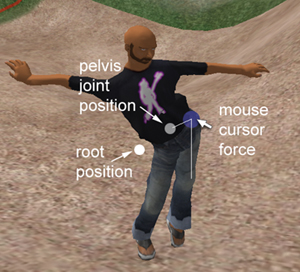
This picture shows the root position as a white dot. The pelvis position can be offset from the root position while puppeteering, as shown. |
|
Joint Representation
Every joint has a position and a rotation in 3D space. A "bone" is the line segment that connects two neighboring joints. Joint rotation is typically represented in the coordinate system of its parent, referred to as "local", or "parent-relative" rotation. In Second Life, rotations are stored as quaternions . Quaternions provide an efficient representation of rotation for computer graphics, and they avoid certain problems associated with other representations, such as Euler angles . |
Physical Avatar requires several layers of joint representation, including the joint's world-coordinate position, its world-coordinate rotation, its parent-relative position, and its parent-relative rotation. It also uses other attributes which are specific to the algorithm, and not very interesting in this context. The most important point is that joints use world-coordinate positions, and this is necessary for physical simulation, as described below. |
3. User Interaction
4. Algorithm for Physically-based Manipulation
|
4.1 Conversion to
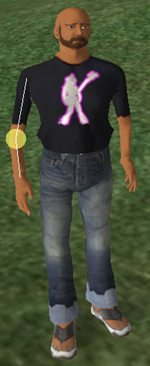
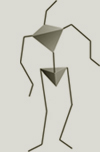
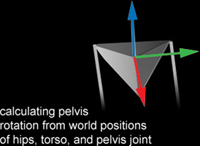
Physical Representation As mentioned above, puppeteering starts when the user hovers the mouse cursor over a joint, presses CONTROL, and clicks the mouse button. This initializes the Physical Avatar engine. At initialization, an array of 24 world-coordinate positions is generated. Starting with the root position and rotation, the hierarchy of parent-relative joint rotations is recursively traversed to calculate the world-coordinate positions. These become the joints of the Physical Avatar skeleton. The default pose array and the parent-relative rotations of each joint are also stored when Physical Avatar is initialized. The world-coordinate positions are used as the locations for a collection of physically-simulated balls floating in space, which correspond to the joints of the avatar at the time of initialization. Each ball is constrained to its neighbors by way of spring forces . "Neighbor" is defined here as the joint's parent and its children, if any. |
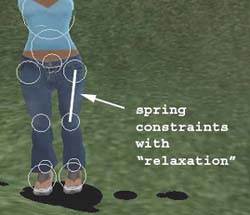
The springs are highly-dampened with ambient friction, and they use a "relaxation" technique - whereby the locations of the balls on either end of a spring are adjusted in the same direction as the spring force. These balls also have soft collision interactions: if any two of them penetrate, they push apart (like tennis balls). They also respond to collisions with the ground surface, and their collision response is affected by ground surface normal for more realism. |
|
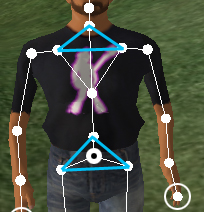
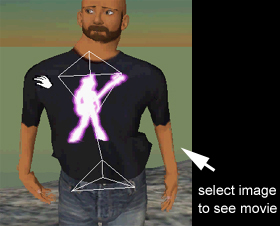
Similar to the pelvis, the chest region has three springs that force the chest
joint, neck joint, and the two collars to become fused, and act as
one rotational unit.
The image at right provides a link to a Quicktime video showing how these spring tetrahedra hold the pelvis and chest rotations stable. You will notice that these tetrahedra are very flat. But they still maintain their tensegrity-like stability. |
|
|
Humanoid Constraints
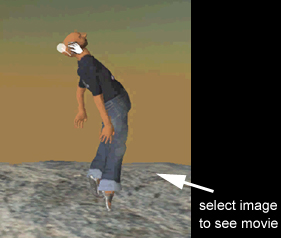
If you don't think it's important to apply human-like constraints on these joints, try bending an elbow backwards, or pulling the head back 120 degrees. The pain endured from just watching your avatar become twisted-sister is enough to convince anyone of the importance of applying limits on how these joints can move in relation to each other. But since the simulation uses balls and springs, with no explicit rotations to the bones, it is not easy to simply say, "don't allow the knee rotation to go less than zero". |
Instead you have to measure relative distances, calculate cross-products and dot-products, and things like that, in order to determine when an implicit rotation has gone past a threshold and also in order to force it back to its preferred state. I will not go into the details of this technique except to say that what is important here are the relative positions of the balls to each other that determine these constraints, and they generally require about three balls to do each calculation. |
|
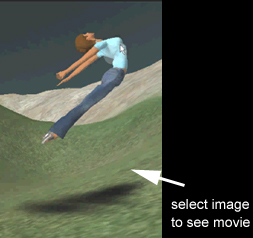
|
|
User-Manipulation Forces
Now I will explain how the user clicks and drags joints. While puppeteering, the user's mouse cursor position is used to project a ray out into the 3D scene (the normalized vector from the camera viewpoint to the cursor location on the view plane. This vector is scaled in length to equal the distance from the camera viewpoint to the ball which the user clicked on to start puppeteering. Once clicked and dragging, this distance remains constant, and the ball sticks to the surface of an implicit sphere surrounding the camera viewpoint. Since the ball being dragged is connected to at least one other ball by a spring force, all neighboring balls get dragged along with it. As explained above, there are various constraints that keep the balls from moving unnaturally. There is also a constraint that keeps the ball being dragged from moving too far away from its original position when clicked. This keeps things fairly well-behaved while puppeteering (although it is turned off for full-blown ragdoll mode, as the video below shows). |
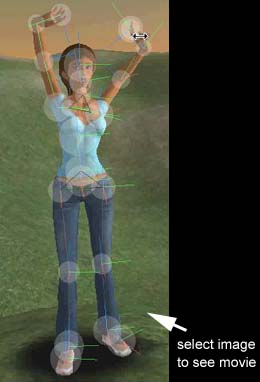
|
|
Gravity, Wind, and...Catapults?
Notice that when the mouse cursor is projected into the scene, it basically becomes a force that constrains one of the balls in the 3D space. But any other force can be applied to the balls as well. For instance, when ragdoll mode is turned on, gravity adds a downward force to all the balls at a constant rate. Other forces could just as easily be used, such as wind, slaps in the face, a wedgie, or being thrown by a catapult. |
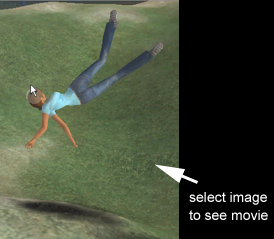
|
|
4.3 Conversion Back
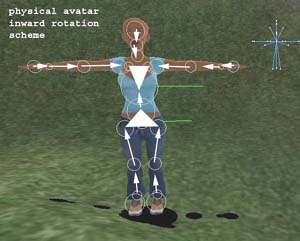
into Rotation-Space OK, it's fun to talk about wedgies, catapults, and stuff. But now it's time to explain the technique for taking the positions of these physical balls and converting all that information into pure rotation. Remember that avatar animation in Second Life (as well as in most systems) is specified using "parent-relative rotations". In other words, each joint's rotation represents a "rotation off it's parent's rotation". Consider the outward-aiming arrows in the image below. Think of the base of each arrow as a joint which can pivot off the tip of the arrow that it is attached to. |
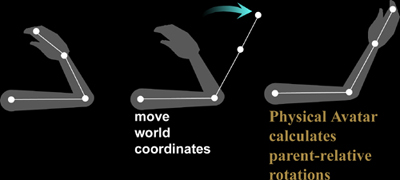
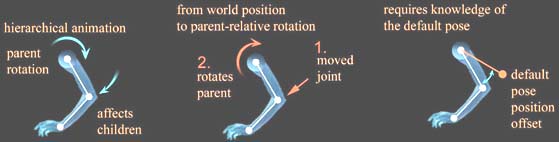
This is basic hierarchical modeling. You could say that the information flows from the pelvis outward to all the joints. Now, I would like to propose that the Physical Avatar system does just the opposite. The information flow goes inward instead of outward. In this sense it is more like inverse kinematics. In hierarchical modeling, the rotation of the elbow determines the position of the wrist. But in the Physical Avatar, the position of the wrist determines the rotation of the elbow (plus a few other things for reference, as explained below). |
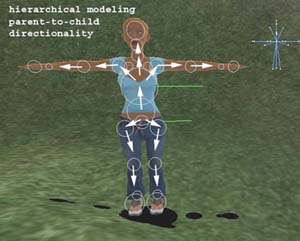
|
|
|
Default Pose as Reference
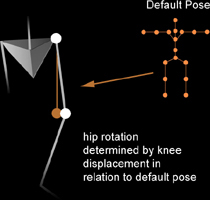
The default pose, or "T-Pose", is the avatar stance shown above - the avatar's arms are extended out and the joints are mostly straight. In this pose, all the joint rotations are set to zero, or identity. Since all rotations are parent-relative, the default pose represents the joint rotations that are used to compare the rotational offsets. In quaternion terms, the difference between the position of a joint and the position of where the joint would be if it were in its default pose determines an arc sweep (a spherical interpolation.), expressed as a quaternion. |
|
5. Networking
Acknowledgements
|
There were several talented developers at Linden Lab who
worked on this project
with me.
Most importantly were the stellar devs Samantha Patterson and Kyle Machulis (Cube). Andrew Meadows and Richard Nelson
helped in the early
stages with math, physics, and architecture.
|
Mike Schlacter did some work on the networking code. Thanks to
Mark Lentczner, Periapse, Cocoa, Qarl, Vector, Kona, and many others. Finally,
thanks to Cory and Philip for seeing the promise of this technology.
|